Skip to content
School transport and dismissal, on one platform

Every school bus ride, accounted for.

Tafwej connects the three points of a child’s day: school, home and bus. Parents see a live countdown to their door. Schools get routes on real roads in one click. Teachers confirm every child in class with a photo. And dismissal runs from the classroom to the car, without queues.

Get the appSchool dashboard
Arabic & English Android · iPhone · Web Live GPS Photo-verified class entry
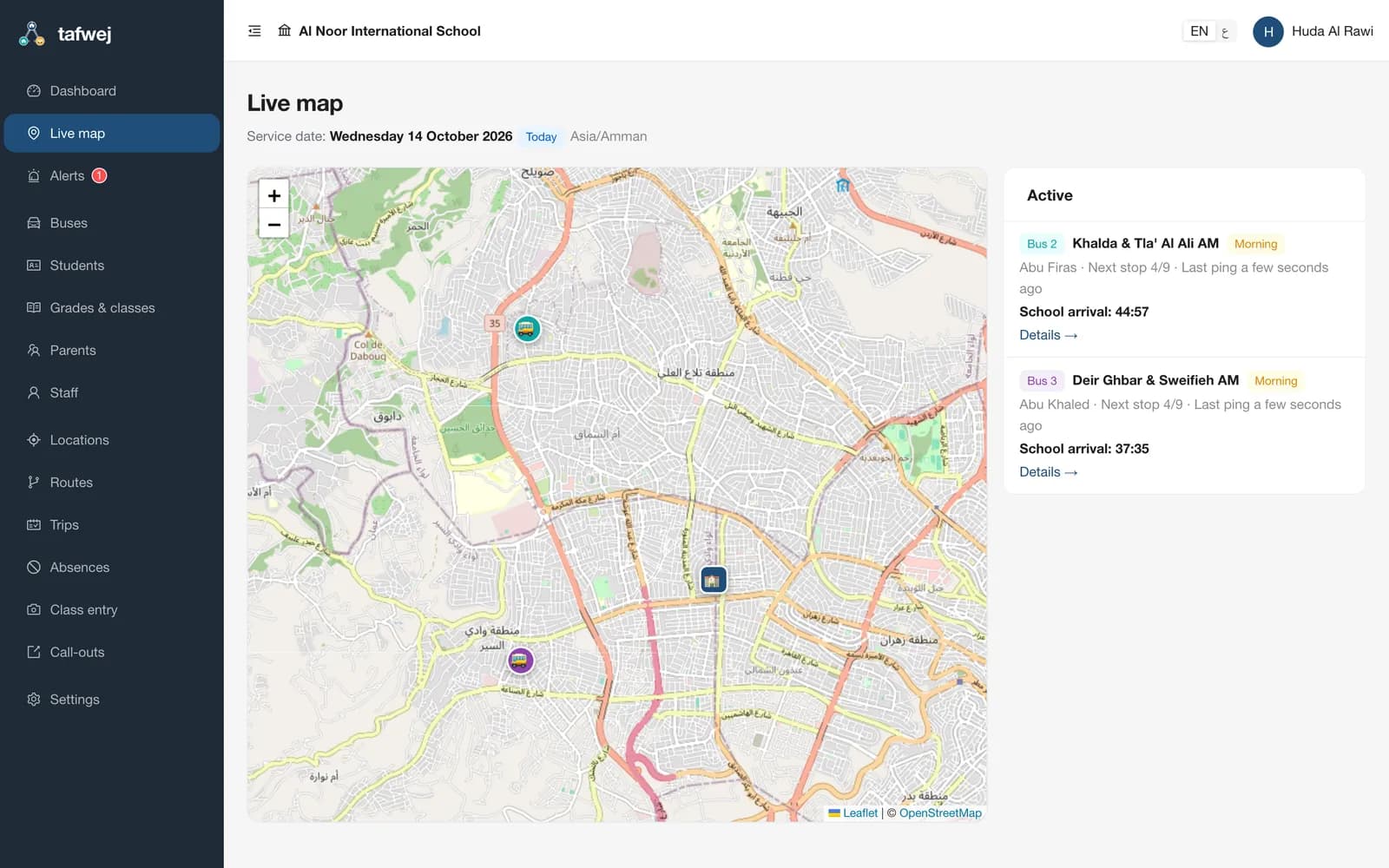
The school dashboard: every bus live on the map
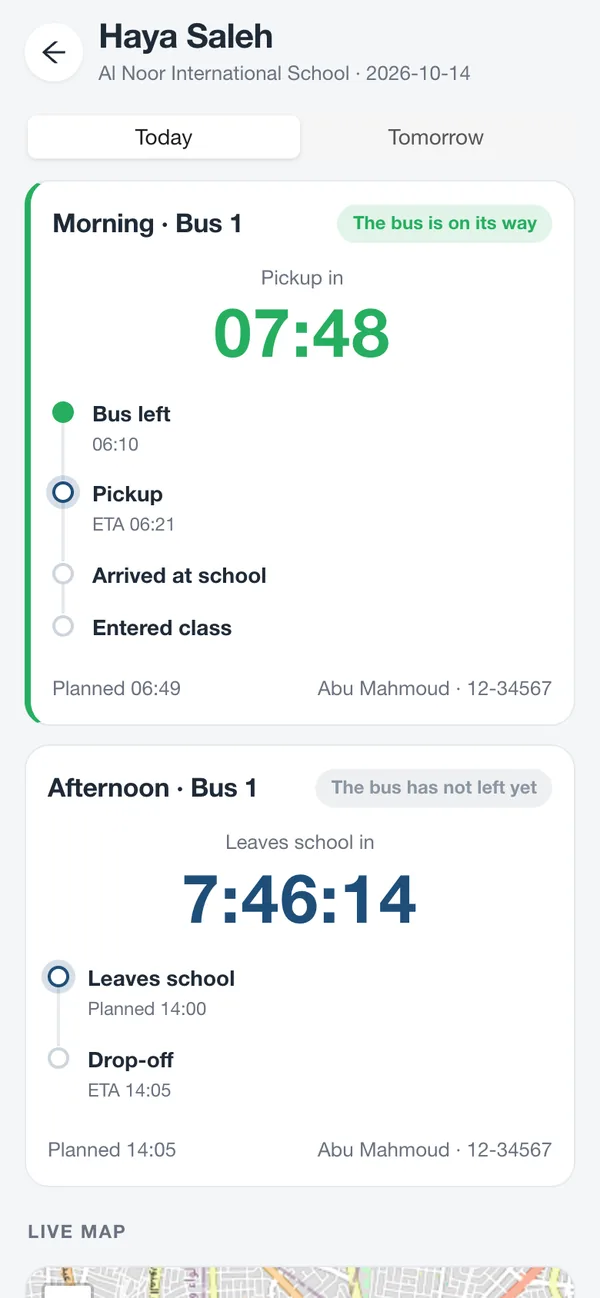
A parent’s live countdown to the pickup
Sound familiar?

The school run is full of small problems. Together, they cost hours and peace of mind.

Every school day starts and ends with the same questions. Tafwej answers each one in the app, so nobody has to ask.

“Where is the bus?”

Parents wait at the door, or out in the heat, not knowing if the bus is two minutes away or twenty, so they call the driver to find out.

With TafwejA live countdown to the door, recalculated from the bus’s GPS, and a notification a few minutes before it arrives.

Phone calls while driving

Drivers juggle calls and WhatsApp messages from dozens of families, with a paper list of who is riding today.

With TafwejStops in order with navigation, a badge scan at boarding, and no calls: parents already see everything.

Routes planned by hand

Every term, someone redraws the routes from vague addresses and spreadsheets. Buses end up overfull and some children ride for an hour.

With TafwejParents pin their home in the app, and one click proposes routes on real roads that respect seats and ride times.

“Did my child reach class?”

A child gets off the bus but never reaches the classroom, and nobody notices until a parent calls at noon.

With TafwejTeachers confirm class entry with a badge scan and a photo. If a child is missing, the school is alerted at once.

Absences nobody hears about

The bus waits outside a house for a child who is sick in bed, and every stop after it runs late.

With TafwejOne tap reports an absence: the bus skips the stop and every family’s countdown updates.

Dismissal chaos

Queues at the gate, names shouted across the yard, and parents waiting while staff look for their children.

With TafwejParents call their child from the gate, the class teacher sends them out with one tap, and parents confirm the pickup.

Addresses in group chats

Home locations, phone numbers and children’s photos end up in WhatsApp groups that anyone can forward.

With TafwejPrivate by design: children’s photos stay private, home locations stay on our servers, and everyone sees only what is theirs.

Too many apps and accounts

Families with children in different schools juggle several systems, often in only one language.

With TafwejOne account for every child in every school, in Arabic and English, on Android, iPhone and the web.

Built for the real school day

1 tap

to report an absence or call your child out

2 min

until the school gets an urgent message about a child missing from class

3 min

until the parents are told, unless the child is found first

0

passwords to remember: sign-in is a one-time code

Alert timings are the defaults; each school can change them.

A school day with Tafwej

From the first bus to the last drop-off, everyone knows

One child’s day, as their parents see it.

  1. 06:20

    The bus sets off

    Parents get a notification, and the live countdown to their door begins.

  2. 06:41

    A few minutes away

    “Bus 1 arrives in ~5 min.” Time to put shoes on, not to stand outside.

  3. 06:46

    On board

    The driver scans the badge. Parents see it at once, and the countdown turns to the arrival at school.

  4. 07:12

    In class

    The teacher confirms class entry with a photo, and it reaches the parents right away.

  5. 07:14

    Nobody left behind

    Every child who came by bus is accounted for. If one is missing, the school is alerted at once.

  6. 14:00

    Dismissal

    Parents collecting by car call their child from the gate, and the class teacher sends them out.

  7. 14:25

    Home again

    Children on the afternoon bus get a countdown to the door, just like in the morning.

How it works

Up and running in days, not months

  1. 1

    The school sets up

    Import students from Excel, link them to grades and classes, add buses, drivers and teachers, and print a badge for every student.

  2. 2

    Parents join

    Parents open their invitation link, sign in with a one-time code and pin their home on the map. No forms, no phone calls.

  3. 3

    Routes in one click

    The school locks the locations and generates routes on real roads. Review the proposal, change anything, and save.

  4. 4

    Trips run themselves

    Each school day’s trips are built automatically. Drivers start the trip and scan badges as children board.

  5. 5

    Everyone stays informed

    Parents follow the live countdown, teachers confirm class entry with a photo, and the school sees every bus live.

  6. 6

    A calm dismissal

    In the afternoon, parents call their child out from the gate and the class teacher sends them out.

One platform, four apps

Everyone gets exactly what they need

For schools

Plan, follow and prove every ride

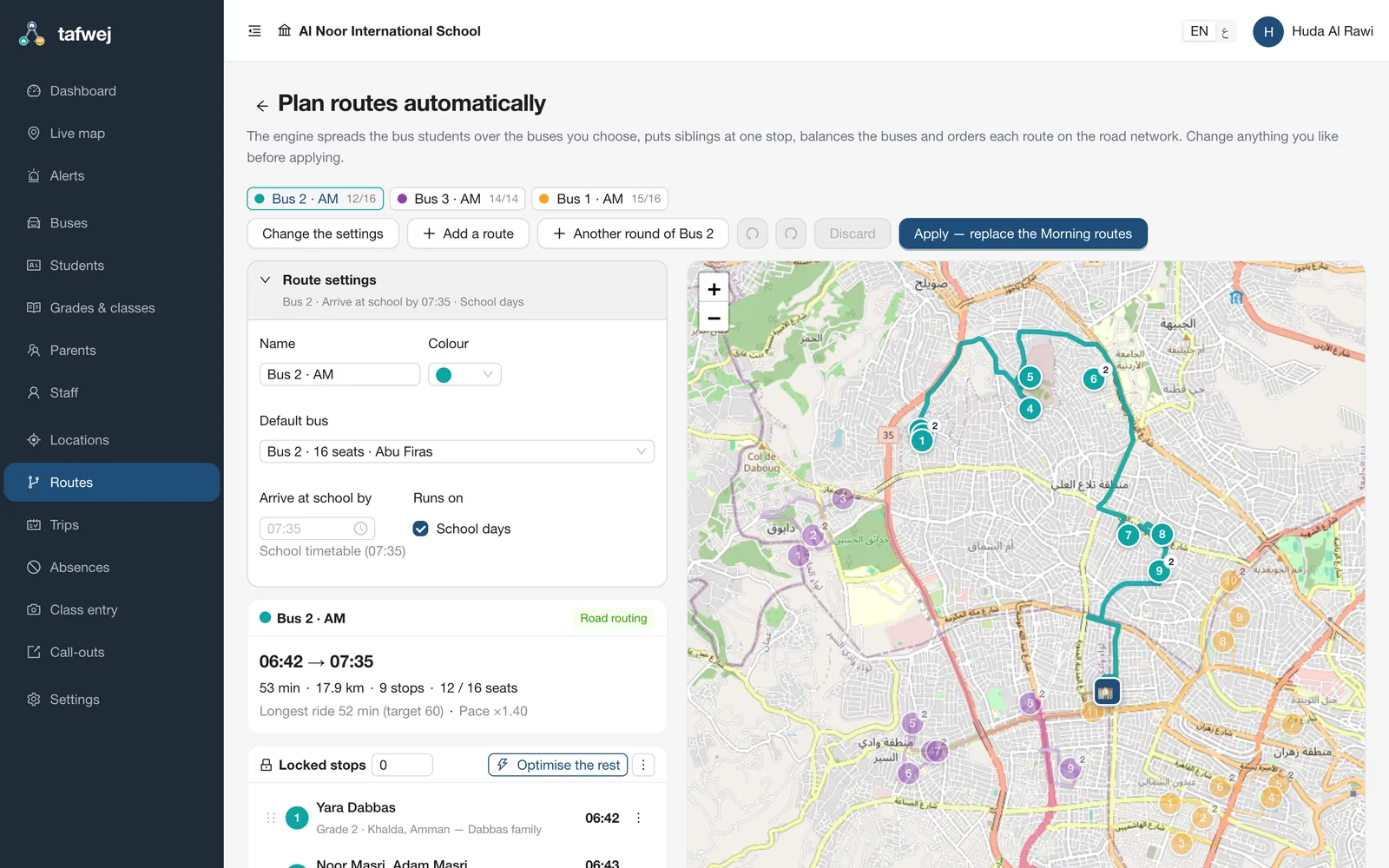
  • Routes on real roads in one click, balanced across your buses
  • A live map of every bus: where it is, who is on board, when it arrives
  • Alerts that escalate when a child is not confirmed in class
  • One board for every call-out at dismissal
  • Excel import, printable badges, grades and classes
Automatic route planning in the school dashboard
For parents

Peace of mind, every morning and afternoon

  • A live countdown and map to the pickup and drop-off
  • Notifications when the bus sets off, gets close, and when your child boards and arrives
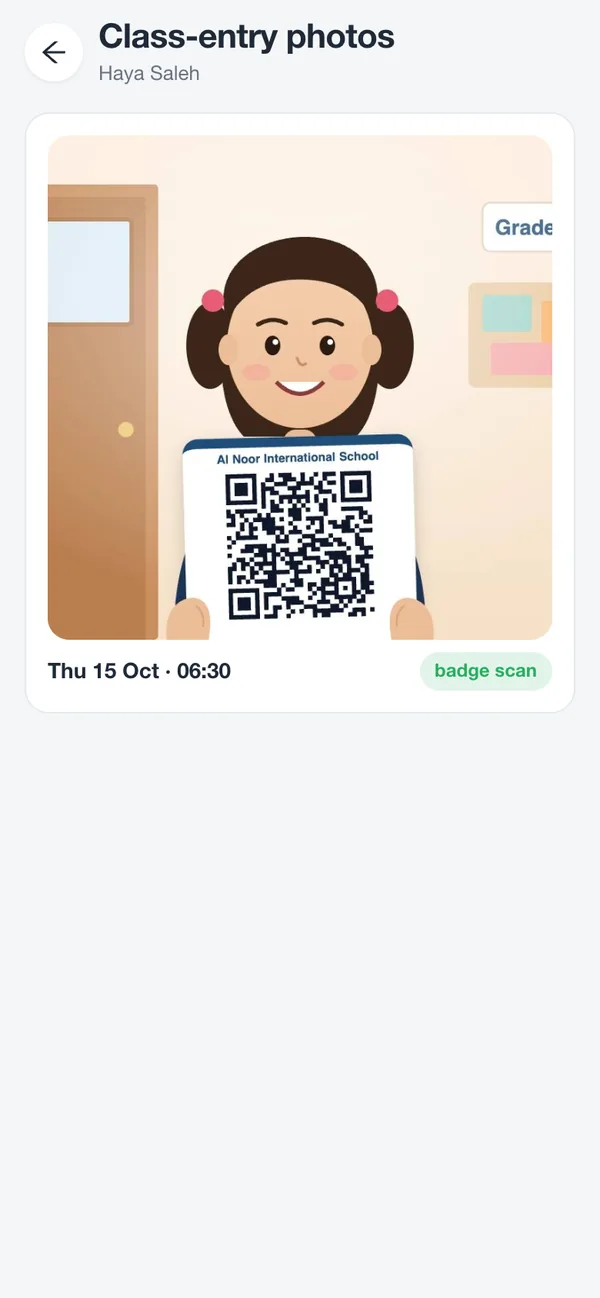
  • The class-entry photo, the moment it is taken
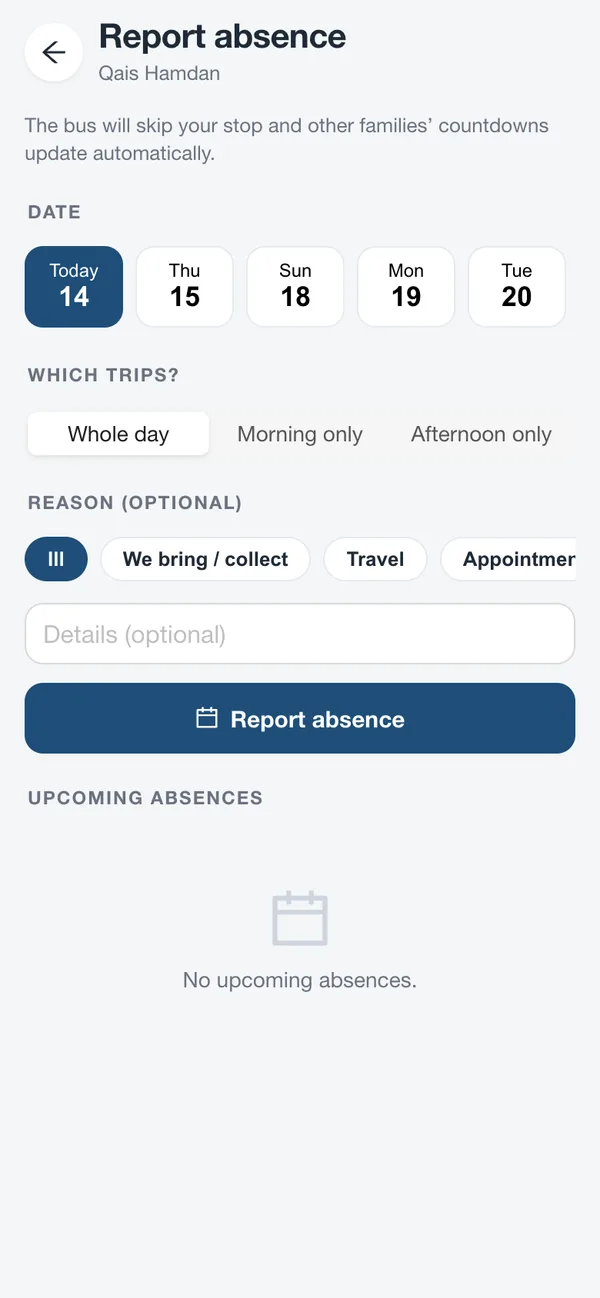
  • Report an absence or call your child out in one tap
  • All your children, in every school, in one account
Reporting an absence in the parent app
The class-entry photo in the parent app
For drivers

A trip without paperwork

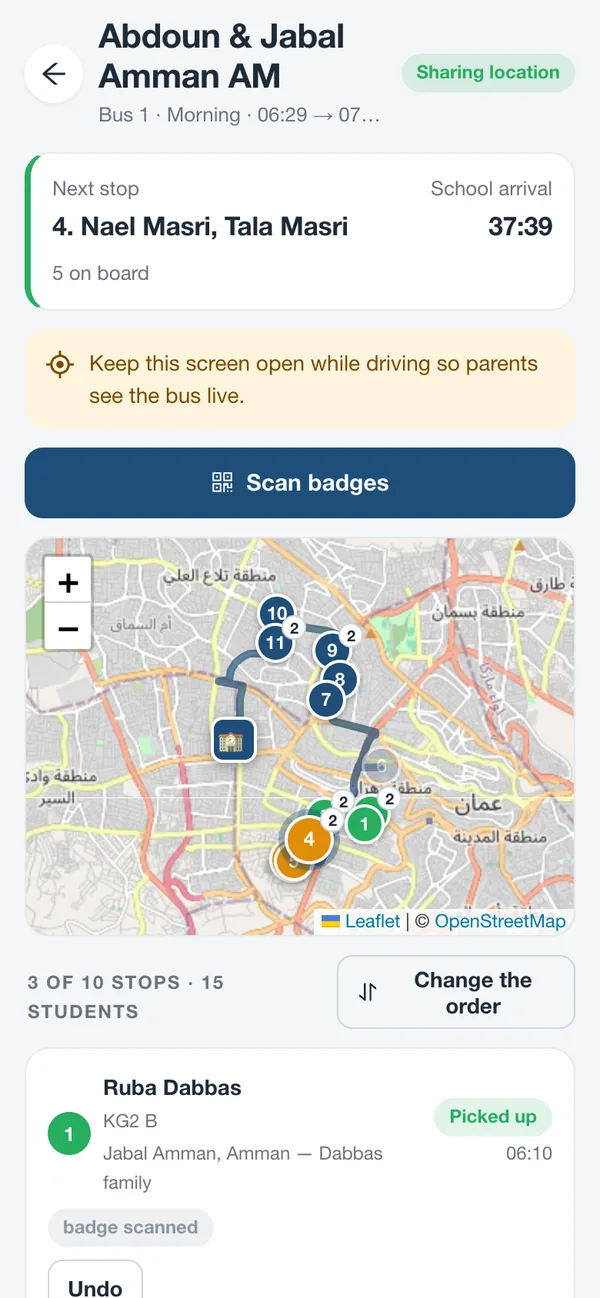
  • Stops in order, with expected times and navigation
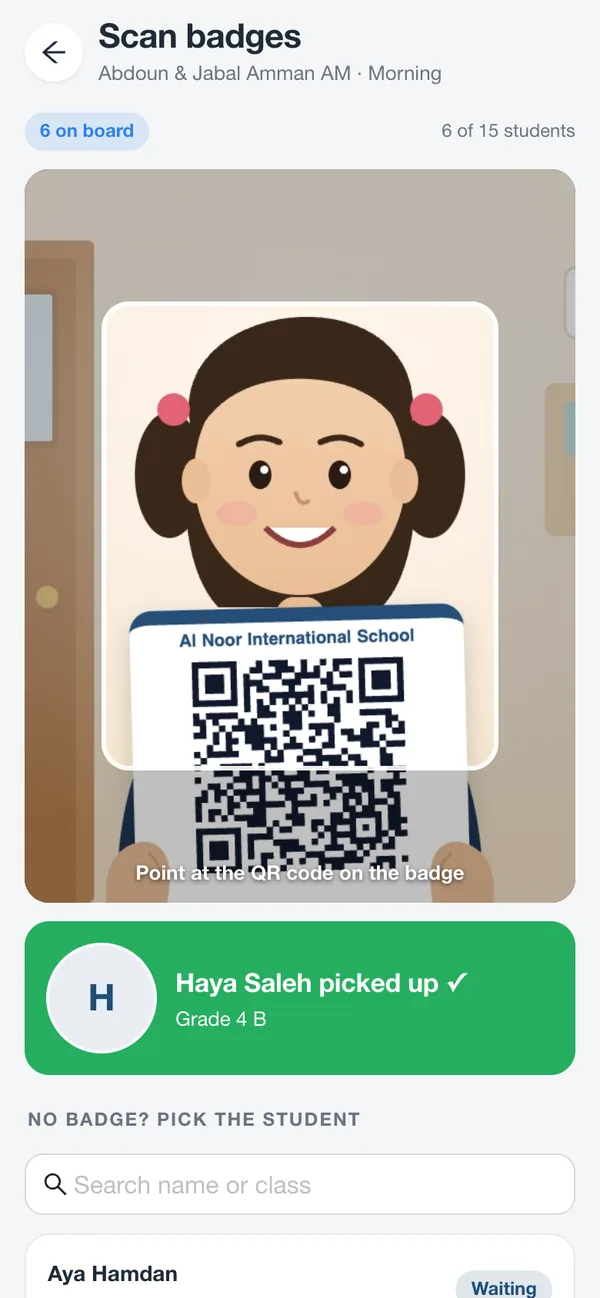
  • Scan each badge at boarding; everything else updates by itself
  • No calls from parents while driving
  • Confirm the bus is empty at the end of the trip
The driver’s trip, stop by stop
Scanning a student’s badge at boarding
For teachers

Class entry and dismissal in a few taps

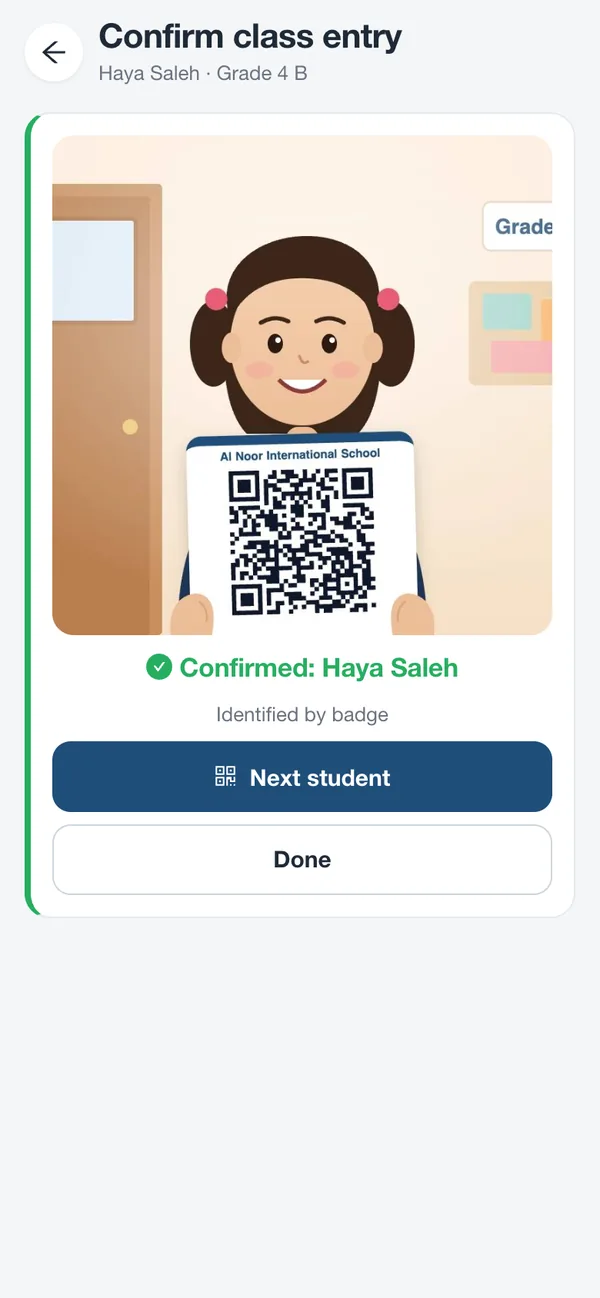
  • Confirm class entry with a badge scan and a photo
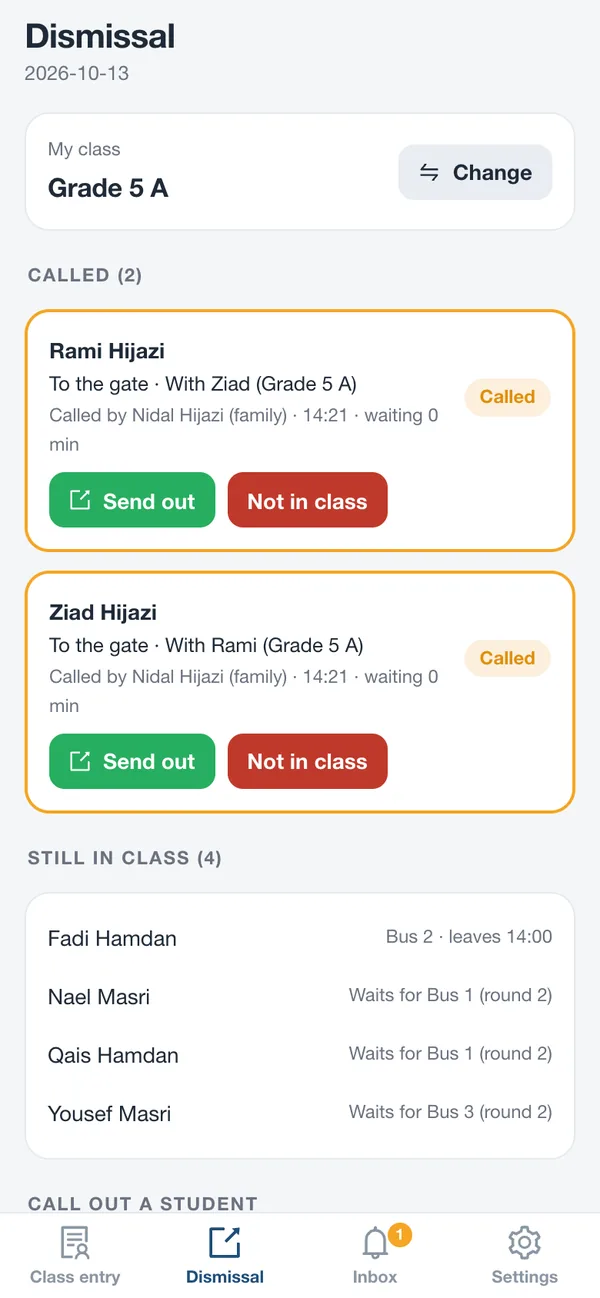
  • Your class’s dismissal list, live
  • Send a child out with one tap, and the parents know they are coming
  • Flag a child who is not in class, and the school knows at once
A class entry confirmed with a photo
The teacher’s dismissal list
Features

Everything the school run needs

Live countdown

To the minute, from the bus’s live GPS and real road travel times.

Automatic routing

Routes on real roads that respect seats, ride times and siblings.

Arrival times that learn

Every trip teaches Tafwej your roads, stops and start times.

Badge scan

A QR badge for every student, scanned at boarding and at class entry.

Photo-verified class entry

Parents get the photo as soon as the teacher confirms.

Escalating alerts

The school first, then an urgent message, then the parents. Closed by itself once the child is found.

Absence in one tap

Whole day, morning or afternoon; the route adjusts for everyone.

Call-outs

From the classroom to the car, with siblings and shared car groups.

One family account

Every child, every school, one sign-in.

Arabic & English

Every screen and message, with a right-to-left layout in Arabic.

Android, iPhone & web

Use the app or the browser, with nothing to configure.

Real-time updates

Screens update the moment something changes, and keep refreshing on their own if live updates drop.

Videos

See Tafwej in action

A quick overview, a full tour of every feature, and a closer look at call-outs.

The full tour

Every feature, chapter by chapter: setup, routes, live tracking, parents, drivers, class entry, dismissal and privacy.

Tafwej in 90 seconds

School, home and bus: the whole day in a minute and a half.

Call-outs: from the classroom to the car

How parents call their children at dismissal, and how teachers send them out.

Privacy & security

Children’s data deserves the highest care

Private photos

Class-entry photos are visible only to the child’s parents and the school, through short-lived private links.

Home locations stay with us

Routes and travel times come from our own routing engine. Homes are never sent to third-party map services.

Everyone sees only what is theirs

Parents see their own children, drivers their trip, teachers their class, and each school only its own data.

Sign-in without passwords

A one-time code by WhatsApp or email. Suspended accounts lose access immediately.

Live updates without personal data

Real-time messages carry ids only: never names or home coordinates.

Hosted in the EU

Servers and databases in Frankfurt, Germany.

Read the privacy policy
User guide

The complete user guide, free to download

Step-by-step instructions with screenshots for every role: school administrators, parents, drivers and teachers. Print it, share it with your staff, or keep it open while you set up.

Welcome to TafwejSetting up your schoolRunning the school dayFor parentsFor drivers and bus attendantsFor teachersSchool admins on the movePrivacy, security and reliabilityQuestions and answers
English edition47 pages
Arabic edition46 pages
FAQ

Questions schools and parents ask

Do parents need to install anything?

No. Tafwej works in the browser on any phone and can be added to the home screen in two taps. No app store needed.

How do parents sign in?

With the phone number or email address the school registered. Tafwej sends a one-time code, so there are no passwords to remember or reset.

How accurate is the countdown?

It is calculated from the bus’s live location and real road travel times, and it learns from every trip: how long each stop takes and how fast each route really runs. It gets more accurate every day.

What happens when a child is absent?

The parent reports it in the app, for the whole day, the morning or the afternoon. The bus skips the stop and the countdown updates for every other family on the route.

What if a child does not reach class?

If a child got off the bus and the teacher has not confirmed them in class, the school is alerted immediately, gets an urgent message after two minutes, and the parents are told after three. The alert closes by itself as soon as the child is confirmed. Each school can change these timings.

Our children are in two schools. Do we need two accounts?

No. One account follows all your children, in every school that uses Tafwej. Brothers and sisters from the same home share a stop.

How are routes created?

From the home locations parents pin in the app. The school locks the locations, and Tafwej proposes routes on real roads that fit each bus’s seats and keep rides short. The school reviews the proposal, changes what it likes and saves. A single day’s trip can be changed without touching the route.

How do call-outs work at dismissal?

When parents reach the gate they call their child from the app. The call goes straight to the teacher attending the class, who sends the child out with one tap. Parents confirm the pickup, and the school follows everything on one board.

Who can see my child’s data?

Only the people who need it: you, your child’s school, and the driver for the trip. Class-entry photos are private, home locations never leave our servers, and live updates carry no names or coordinates.

Which languages does Tafwej support?

Arabic and English, everywhere: the apps, the dashboard, notifications and the user guide. Each person chooses their own language.

What does a school need to get started?

A list of students (Excel or CSV), your buses and your staff. Parents join from an invitation link, and the user guide walks every role through the first day.

Bring Tafwej to your school

Set up your school in an afternoon, and give every family peace of mind from the first morning.
Questions? Write to us at omar@tafwej.com